
Fapcraft Java Edition
Welcome to the official repository for Fapcraft Java Edition. All mod files (.JAR) provided here are meticulously tested, digitally signed, and verified to ensure a safe, stable, and enhanced Minecraft experience. Choose your game version below to begin your adventure.
Why Choose Fapcraft over Legacy Mods?
Stop dealing with outdated and unstable versions. Fapcraft is the modern successor, engineered for optimal performance and expanded content.
| Key Feature | Fapcraft (Official) | Legacy Mods |
|---|---|---|
| Version Support | 1.20.1 & 1.21.x | 1.12.2 / 1.16.5 |
| Stability | Zero Crash Engine | Frequent Crashes |
| Characters | 10+ Entities | 2-3 Only |
| Security | Verified Binaries | High Risk Mirror |
| Performance | Multi-threaded | Laggy (Single) |
Select Your Fapcraft Java Build
Find the perfect Fapcraft mod build for your Minecraft Java Edition. Ensure you select the correct version compatible with your existing game installation. Download links are direct and secure.
Minecraft 1.21.1 Latest
Minecraft 1.20.1 Stable
Minecraft 1.16.5 Legacy
Minecraft 1.21.124 Classic
Source Code (2.3.2)
Fapcraft Assets
Install Forge + Java Environment

Before installing the mod, ensure you have the correct version of Minecraft Forge that matches your game version.
Initialize the Forge Profile
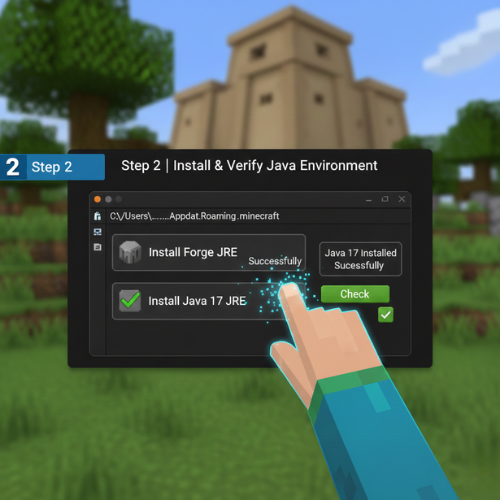
Once Forge is installed, open your Minecraft Launcher and select the Forge Profile from the version dropdown. Click “Play” to launch the game once and reach the main menu, then close it.
Deploy the Mod File to Directory
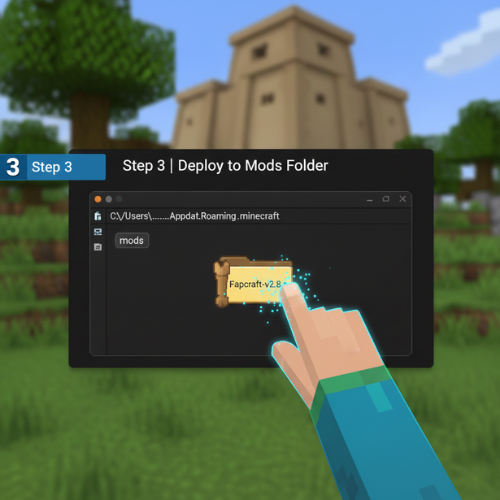
Now, locate your game directory to place the mod file. Press Windows Key + R on your keyboard, type %appdata%, and hit Enter.
Navigate to the .minecraft folder.
Open the mods sub-folder.
Drag and drop the downloaded Fapcraft .jar file directly into this folder.
Launch & In-Game Verification
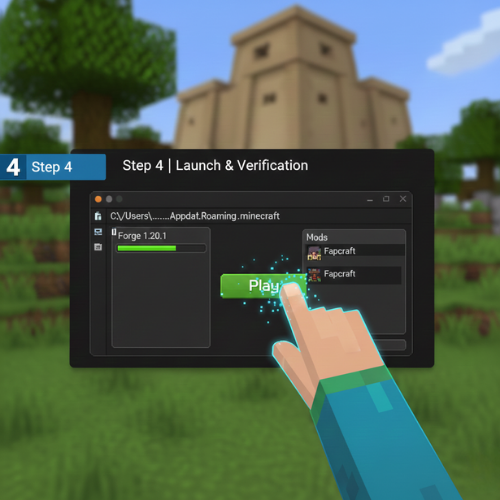
Re-open the Minecraft Launcher and start the game using the Forge profile. Once the Main Menu loads, click on the “Mods” button.

Quick Troubleshooting Tips
1)
Allocated RAM:
We recommend allocating at least 4GB of RAM in your Launcher settings for smooth animation rendering.
2)
Mod Conflicts:
Ensure there are no legacy “Jenny Mod” files in your folder, as they will conflict with Fapcraft’s updated engine.